Add Blocklists & Allowlists to the Pi-hole
Pi-hole v6 manages blocklists and allowlists natively through the web interface or command line.
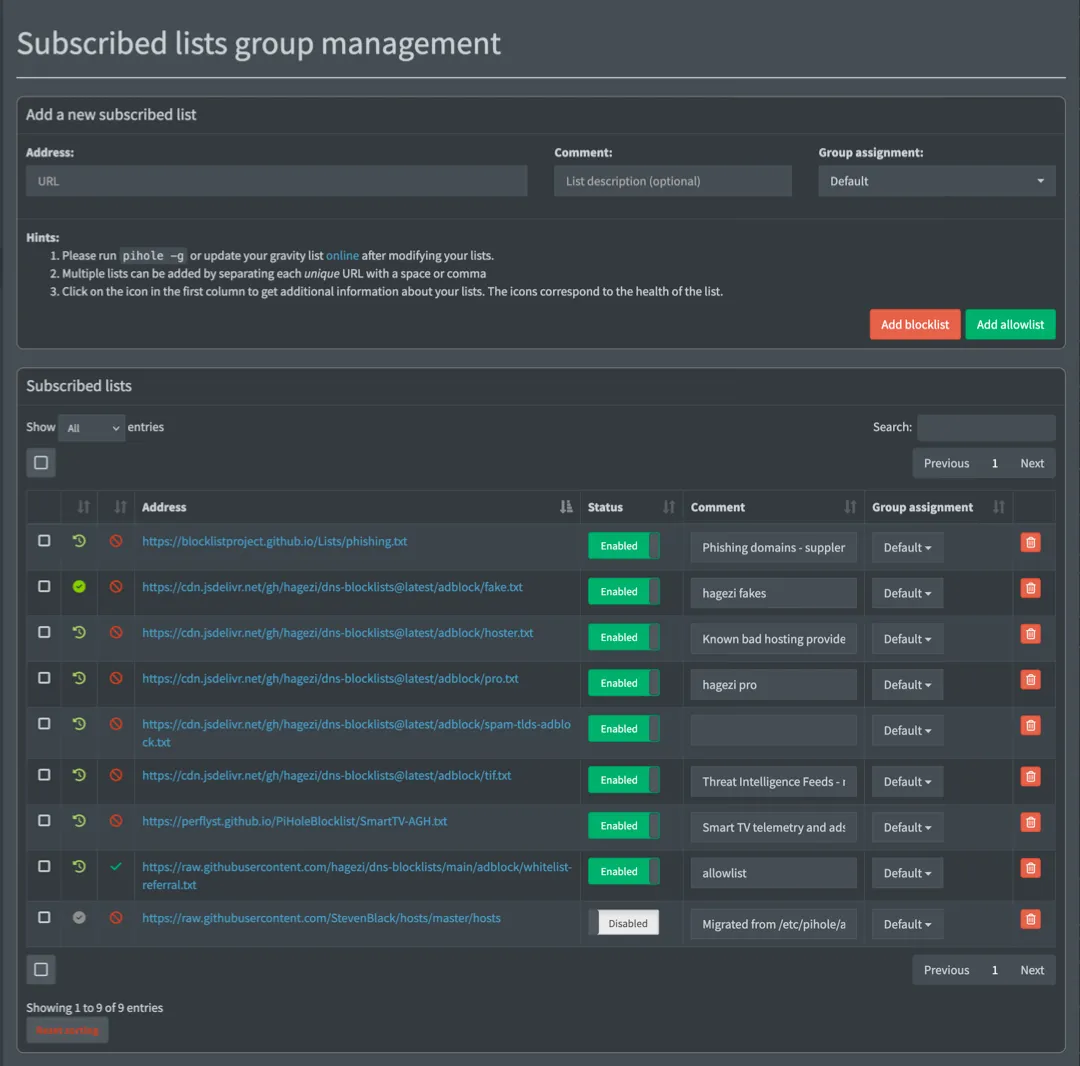
Blocklists tell Pi-hole which domains to block. Allowlists tell it which ones to always let through, even if they match an entry on the blocklist.
A bigger blocklist isn’t necessarily better and can cause issues for day-to-day browsing or streaming. Many services depend on domains that look like tracking but are required to work.
Most streaming apps run a verification chain on launch: they contact telemetry or analytics domains, and if those fail, the streaming app refuses to play content. This can be frustrating and has led to a number of “why isn’t the TV working” complaints in my house.
If you’re just here to add lists, you can skip to the section:
How to Choose the Best Pi-hole Blocklist
Section titled “How to Choose the Best Pi-hole Blocklist”The two most-recommended Pi-hole blocklists are HaGeZi and OISD. Both are well-maintained, low-false-positive options.
The difference is how much control you want:
OISD Big is a single URL, maintained by one person, optimized for zero breakage.
If you want to set it and never think about it again, use https://big.oisd.nl/.
HaGeZi aggregates dozens of upstream sources including OISD, StevenBlack, EasyList, EasyPrivacy, URLHaus, and PhishTank into tiered lists you can dial up or down. At the Normal tier it’s comparable to OISD Big. At Pro and above it blocks significantly more, and OISD is still included as an upstream source. HaGeZi also offers supplementary category lists (threat intelligence, spam TLDs, smart TV telemetry) that don’t have OISD equivalents.
This guide uses HaGeZi because the tiered approach gives a clear choice between “fewest possible issues” and “maximum blocking,” and the supplementary lists add coverage that a single all-in-one list can’t match.
Most of the setup in this guide relies on one maintainer.
Six of the lists below come from HaGeZi. If the project goes inactive, the supplementary lists (Perflyst Smart-TV, BLP Phishing) will keep working, but the core blocklist won’t update. OISD Big is a natural, and still excellent, fallback.
Choose a HaGeZi tier
Section titled “Choose a HaGeZi tier”-
HaGeZi Normal
- Balanced blocking with minimal false positives. Good for environments where there’s no admin nearby to unblock something.
-
HaGeZi Pro
-
Good coverage, manageable breakage (this guide uses this) More aggressive than “Normal,” but still reasonable for daily use.
Occasionally blocks something legitimate. Check the query log when something breaks.
-
-
HaGeZi Pro++
- HaGeZi recommends this for experienced users with an admin available to troubleshoot.
For quick reference, the full tier progression is: Light > Normal > Pro > Pro++ > Ultimate. See HaGeZi’s README for descriptions of each.
Recommended blocklists
Section titled “Recommended blocklists”If you enabled the default blocklist or previously used The Firebog, StevenBlack/hosts, or 1Hosts, you can disable them in favor of the lists on this page.
HaGeZi already includes these as upstream sources. They can create duplicate entries without providing additional coverage. Pi-hole deduplicates during Gravity updates so it won’t break anything, but it’s unnecessary weight.
-
Choose one core HaGeZi list:
-
HaGeZi Normal
https://cdn.jsdelivr.net/gh/hagezi/dns-blocklists@latest/adblock/multi.txt -
HaGeZi Pro (recommended)
https://cdn.jsdelivr.net/gh/hagezi/dns-blocklists@latest/adblock/pro.txt -
HaGeZi Pro++
https://cdn.jsdelivr.net/gh/hagezi/dns-blocklists@latest/adblock/pro.plus.txt
-
-
Optional: Choose any supplementary lists (use with either tier):
-
HaGeZi TIF
Threat Intelligence Feeds - malware, phishing, cryptojacking
https://cdn.jsdelivr.net/gh/hagezi/dns-blocklists@latest/adblock/tif.txt -
HaGeZi Bad Hoster
Known bad hosting providers
https://cdn.jsdelivr.net/gh/hagezi/dns-blocklists@latest/adblock/hoster.txt -
HaGeZi Anti-Piracy
Piracy-related domains
https://cdn.jsdelivr.net/gh/hagezi/dns-blocklists@latest/adblock/anti.piracy.txt -
HaGeZi Spam TLDs
Entire TLDs with no legitimate traffic
https://cdn.jsdelivr.net/gh/hagezi/dns-blocklists@latest/adblock/spam-tlds-adblock.txt -
Smart-TV Blocklist
Smart TV telemetry and ads
https://perflyst.github.io/PiHoleBlocklist/SmartTV-AGH.txt -
BLP Phishing
Phishing domains - supplements HaGeZi TIF
https://blocklistproject.github.io/Lists/phishing.txt
-
Add Blocklists to Pi-hole
Section titled “Add Blocklists to Pi-hole”To add a list:
-
Log in to the Pi-hole web interface at
https://pi-hole.local/admin. -
Go to Lists.
-
Paste a list URL, then select Add blocklist.
-
After you add all the lists, update the Pi-hole’s list settings (what it calls “Gravity”) in Tools > Update Gravity to apply them, or use the CLI:
From the Pi pihole -gGravity also runs automatically on a weekly schedule.
Add Allowlists and Domains to Pi-hole
Section titled “Add Allowlists and Domains to Pi-hole”There are two ways to allowlist in Pi-hole v6:
- List subscriptions: Subscribe to a URL and Pi-hole manages it automatically, like a blocklist. Best for maintained collections of domains.
- Individual domain entries: Add a single domain directly in Domains > Allowlist in the web interface. Best for one-off fixes when a specific service breaks.
Subscribe to a referral allowlist
Section titled “Subscribe to a referral allowlist”The HaGeZi Referral Allowlist is a maintained collection of domains that blocklists commonly block but that services legitimately need. Adding it as a subscription prevents a large category of false positives before they happen.
-
In the Pi-hole web interface, go to Lists.
-
Paste the allowlist:
https://raw.githubusercontent.com/hagezi/dns-blocklists/main/adblock/whitelist-referral.txt -
Select Add allowlist
-
After you add all the lists, update Gravity in Tools > Update Gravity to apply them, or use the CLI:
From the Pi pihole -gGravity also runs automatically on a weekly schedule.
Add an Individual Domain to the Allowlist
Section titled “Add an Individual Domain to the Allowlist”You can instruct Pi-hole to allow individual domains.
This is different from the lists we added in previous sections.
If you encounter an error with a website or service, check the query log at https://pi-hole.local/admin/queries.
Select Advanced filtering to filter by client or domain and sort by time.
After you find the domain, select Allow to add the domain to the allowlist.
See Troubleshoot a Broken Service for tips.
Fix Streaming Services and Other Broken Sites
Section titled “Fix Streaming Services and Other Broken Sites”If a service stops working after you set up Pi-hole, the likely cause is a blocked domain. The sections below list known fixes for common services.
You can use the Pi-hole dashboard to add multiple domains one at a time through the Domains section at https://pi-hole.local/admin/groups/domains.
The CLI allows you to add multiple domains in the same command.
For each service in the sections below, you can copy the domains from the table into the dashboard, or run the pihole allowlist command.
Run the command for the services you use, then run pihole -g to apply the changes.
Note that domains can change. Streaming services update their CDN and analytics infrastructure regularly. If a service breaks again after you’ve already allowlisted it, check the query log for newly blocked domains.
Disney+
Section titled “Disney+”pihole allowlist geolocation.onetrust.com registerdisney.go.com global.edge.bamgrid.com disney.demdex.net| Domain | Why it’s needed |
|---|---|
geolocation.onetrust.com | Geolocation and rights verification - checked on launch |
registerdisney.go.com | Authentication - needed at sign-in and on app launch |
global.edge.bamgrid.com | Core streaming CDN |
disney.demdex.net | Audience/identity service - blocks cause content to fail to load |
Required for ad-supported plans.
On Hulu’s ad-supported plan, ad-serving domains share infrastructure with content delivery. Blocking ads breaks playback entirely.
There is no domain you can allowlist to effectively block the ads. Sorry.
pihole allowlist geolocation.onetrust.com| Domain | Why it’s needed |
|---|---|
geolocation.onetrust.com | Same geolocation check as Disney+ |
Paramount+
Section titled “Paramount+”Paramount+ uses Google’s Dynamic Ad Insertion, which means fixing it requires allowlisting Google ad infrastructure domains (which defeats the purpose of Pi-hole).
The better fix is to put the Paramount+ device in a bypass group so it skips filtering entirely. See Skip Pi-hole for a Specific Device below.
YouTube
Section titled “YouTube”Pi-hole cannot effectively block YouTube video ads.
Google serves ads and content from the same domains and there is no DNS-level way to separate them. Pi-hole can block some banner ads on the YouTube website, but pre-roll and mid-roll video ads are unaffected. This is a fundamental limitation of DNS-based blocking, not a configuration problem.
For YouTube in the browser, an extension like uBlock Origin can be more successful.
Netflix, Max, Apple TV+
Section titled “Netflix, Max, Apple TV+”These services generally work without individual domain allowlisting. If thumbnails fail to load or playback fails, check the query log for blocked CDN domains and allowlist as needed.
Samsung Smart TVs
Section titled “Samsung Smart TVs”These domains are required for the Smart Hub, app downloads, and basic platform functionality. Blocking them can break the entire app ecosystem, not just one service.
pihole allowlist samsungcloudsolution.com lcprd1.samsungcloudsolution.net time.samsungcloudsolution.com| Domain | Why it’s needed |
|---|---|
samsungcloudsolution.com | Smart Hub core service |
lcprd1.samsungcloudsolution.net | CDN for Smart Hub content |
time.samsungcloudsolution.com | Platform time sync |
Amazon Fire TV / Fire Stick
Section titled “Amazon Fire TV / Fire Stick”pihole allowlist fireoscaptiveportal.com dp-discovery-na-ext.amazon.com| Domain | Why it’s needed |
|---|---|
fireoscaptiveportal.com | Network connectivity check - blocks cause “no internet” errors |
dp-discovery-na-ext.amazon.com | App discovery and store |
Roku devices are sensitive to blocked telemetry domains and apps might load but show no thumbnails, or video won’t play. Specific blocked domains vary by region and Roku model. Use the query log method to identify what your device requests.
Control Blocking Per Device with Groups
Section titled “Control Blocking Per Device with Groups”By default, every device on your network is part of the same Default group and follows that group’s rules.
Pi-hole’s group system lets you change that per device so that you can assign a group to skip blocking entirely for problem devices, or to apply stricter rules for a specific device like a child’s laptop.
All blocklists are assigned to the Default group, and every device is in that group unless you change it.
A device can be added to multiple groups at the same time and will follow the combined rules of all its groups.
Skip Pi-hole for a Specific Device
Section titled “Skip Pi-hole for a Specific Device”Useful for a device where blocking breaks functionality and you can’t or would rather not troubleshoot it (smart TVs, streaming sticks, Paramount+, Roku).
-
Find the device’s IP address in Tools > Network or based on its traffic in the Query Log.
-
Go to Groups and add a new group. Name it something like
skiporunfiltered. -
Go to Clients and search for or select the device from the Known clients dropdown.
-
Under Group assignment, uncheck
Defaultand select your new group. -
Select Add.
The device now resolves DNS without any filtering. All other devices are unaffected.
Block YouTube and Social Media for a Specific Device
Section titled “Block YouTube and Social Media for a Specific Device”Apply extra blocklists on top of the normal ones without affecting the rest of the network. This can be useful for a child’s device or a school-issued laptop.
-
Confirm that the device’s network traffic isn’t being routed through a VPN.
You can do this by checking the IP on one of your other devices and on the device you want to restrict.
- If the IPs are the same, continue to the next step.
- If the IPs are different, the device is probably directing traffic through a VPN and these steps won’t work.
-
Go to Groups and add a new group. Name it something like
kidsorrestricted. -
Go to Lists and add the lists you want to apply to this group.
-
Under Group assignment, unselect
Defaultand select the new group.Recommended lists for parental filtering (all from HaGeZi):
What it blocks URL Social media (Facebook, Instagram, TikTok, X, Snapchat) https://cdn.jsdelivr.net/gh/hagezi/dns-blocklists@latest/adblock/social.txtNSFW and adult content https://cdn.jsdelivr.net/gh/hagezi/dns-blocklists@latest/adblock/nsfw.txtDoH/VPN/TOR bypass (prevents tunneling out of filtering) https://cdn.jsdelivr.net/gh/hagezi/dns-blocklists@latest/adblock/doh-vpn-proxy-bypass.txt -
Go to Clients and add the device.
-
Under Group assignment, keep
Defaultand add the new group. -
Select Add.
The device is now blocked by everything in Default as well as the extra lists.
Other devices that are not in the new group are unaffected.
Checkpoint
Section titled “Checkpoint”Pi-hole is now blocking ads across your network with a curated list configuration:
- Gravity shows a domain count in the dashboard (run
pihole -gif it’s empty) - Streaming services load without issues, or you’ve identified which devices need a bypass group
- Any problem devices are in a skip group, and any restricted devices are in a group with extra lists
- If you run into issues, see Common Pi-hole Issues.
The next page covers configuring your router so every device on the network uses Pi-hole for DNS automatically.